Instagram’s Edits App Expands to Desktop, Challenging CapCut for Pro Creators
Instagram is stepping up its game in the video editing arena by launching a desktop version of its Edits app. This move aims to empower creators with more sophisticated tools for complex projects, directly challenging established players like ByteDance’s CapCut.
The desktop application, now available for Mac users, is specifically designed to leverage the advantages of a larger screen, mouse, and keyboard. This allows for more intricate editing tasks that can become cumbersome on mobile devices. Instagram’s goal is to cater to creators whose projects have outgrown the limitations of smartphone editing, offering a more robust environment for detailed work.
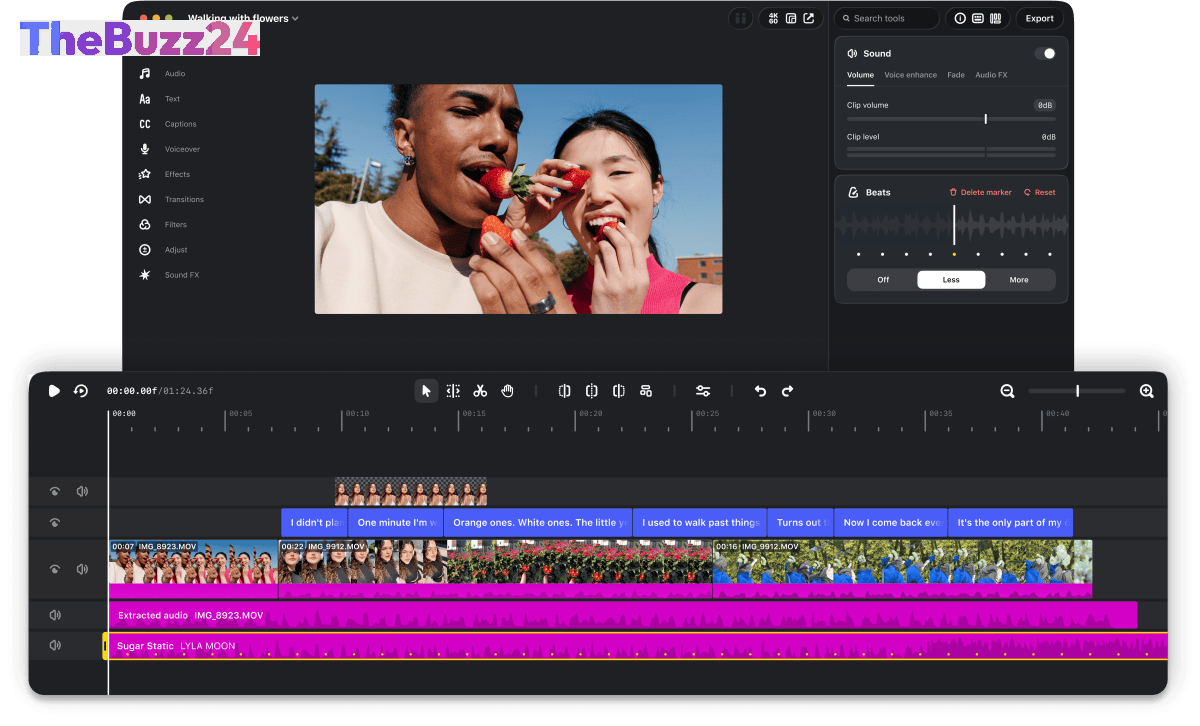
Instagram’s Edits desktop app comes equipped with a suite of professional features. These include licensed music, a variety of sound and video effects, and automatic multi-language captioning. Users will benefit from synchronized audio and text styles from the mobile app, customizable keyboard shortcuts, and the ability to import settings from other editing software. The interface boasts a full multi-track timeline, keyframe capabilities for smooth transitions, and audio waveforms for precise editing, alongside support for importing custom font files.
This expansion signifies Instagram’s commitment to supporting its growing creator base. The ability to publish directly to Instagram from the desktop editor, complete with native features like tagging and location, streamlines the workflow significantly. Creators will no longer need to shuttle files between desktop and mobile for final touches. Furthermore, the app supports both horizontal and vertical video formats, offering watermark-free 4K exports suitable for cross-platform sharing or personal archives. Instagram has indicated a commitment to weekly updates and is actively working on seamless project synchronization between desktop and mobile versions.
Key Takeaways
- Instagram's Edits app is now available on desktop (Mac) to handle more complex video editing projects.
- The desktop version directly competes with CapCut, offering advanced features like multi-track timelines and keyframes.
- The update aims to streamline creator workflows by allowing direct publishing from desktop and improving cross-platform compatibility.
Editor’s Analysis & Impact
Instagram’s strategic move to bring its Edits app to desktop signals a significant push to capture a larger share of the professional video creation market. By directly confronting CapCut, a dominant force in creator-focused editing, Instagram is positioning itself as a more comprehensive platform. This expansion addresses a key pain point for creators – the limitations of mobile editing for ambitious projects. The inclusion of advanced features and seamless integration with the Instagram publishing workflow could attract a substantial user base, potentially impacting user engagement and content quality on the platform. The focus on weekly updates and cross-platform synchronization suggests a long-term commitment to evolving the tool to meet professional demands.
Frequently Asked Questions
Q: What is Instagram Edits?
A: Instagram Edits is a short-form video editing application developed by Instagram, designed to provide creators with tools to produce and refine video content. It was initially launched for mobile devices and has now expanded to desktop.
Q: Who is Instagram Edits on desktop intended for?
A: The desktop version of Instagram Edits is intended for creators who undertake more complex video editing projects that benefit from the precision and capabilities of a larger screen, mouse, and keyboard, moving beyond the limitations of mobile editing.
Q: What are the key features of the desktop Edits app?
A: Key features include a multi-track timeline, keyframe animation, audio waveforms, licensed music, sound and video effects, automatic captions, custom font import, and direct publishing to Instagram. It also supports watermark-free 4K exports in various formats.
AI Disclosure: This article is based on verified data and official reports. Our Team and AI have cross-referenced every financial detail with primary sources to ensure total accuracy.
More from this Category