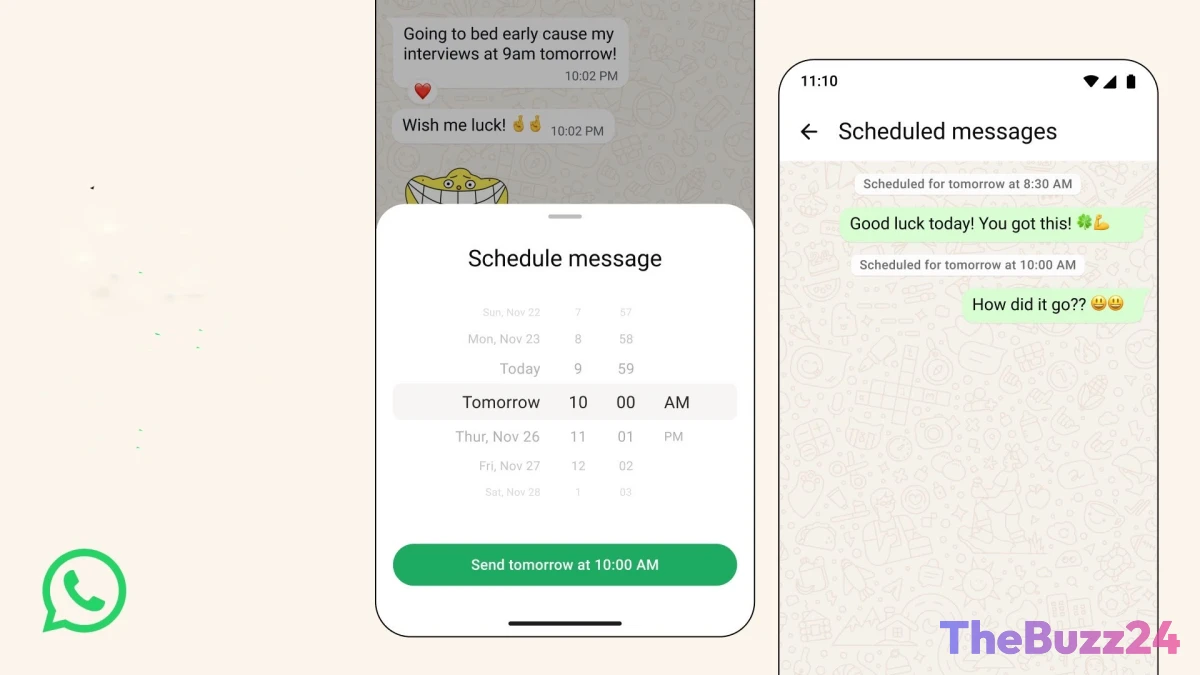
WhatsApp Unlocks Message Scheduling for All Users
Meta’s popular messaging platform, WhatsApp, has officially begun rolling out a highly anticipated message scheduling feature to its global user base on both iOS and Android devices. This new functionality allows users to compose messages and set them to be sent at a future time, ranging from 10 minutes to as far as 14 days in advance.
To utilize the feature, users can type their message and then perform a long-press on the send button, revealing the option to schedule. Once a message is scheduled, users will have the ability to view and delete it from their chat history. While editing the scheduled time is not explicitly mentioned, the capability to manage and remove upcoming messages provides a degree of control.
Significantly, scheduled messages are designed to be delivered even if the user’s phone is powered off or lacks network connectivity at the designated time. This ensures reliability for timely communication. The feature supports various content types, including text, photos, and videos, broadening its utility.
The introduction of message scheduling is expected to enhance user experience in several ways. It can help users remember important dates like birthdays or facilitate communication across different time zones. For businesses, the feature offers a streamlined method for sending out customer updates and announcements. Professionals coordinating projects may also benefit from the ability to schedule important team notifications.
Key Takeaways
- WhatsApp has launched a message scheduling feature for individual and group chats globally.
- Users can schedule messages up to 14 days in advance, with delivery guaranteed even if the phone is off or offline.
- The feature aims to improve user convenience for personal communication and business updates.
Editor’s Analysis & Impact
The integration of message scheduling into WhatsApp marks a significant, albeit belated, enhancement to its feature set, bringing it in line with competitors like Telegram and Signal. This move is likely to be well-received by its vast user base, particularly for personal reminders and cross-time zone communication. For businesses, the ability to automate customer outreach and updates could streamline marketing and communication efforts, potentially boosting engagement. While the core functionality is straightforward, its reliable delivery mechanism, even offline, addresses a key user need. The long-term impact will depend on user adoption and whether further enhancements, such as editing scheduled messages, are introduced.
Frequently Asked Questions
Q: How do I schedule a message on WhatsApp?
A: To schedule a message, type your message in the chat, then long-press the send button. You will see an option to choose a future date and time for the message to be sent.
Q: Can scheduled messages be sent if my phone is off?
A: Yes, WhatsApp's scheduled messages are designed to be sent even if your phone is turned off or not connected to a network at the scheduled time.
Q: What types of content can be scheduled?
A: You can schedule messages containing text, photos, and videos.
AI Disclosure: This article is based on verified data and official reports. Our Team and AI have cross-referenced every financial detail with primary sources to ensure total accuracy.
More from this Category