Laytr Revolutionizes Digital Archiving with Privacy-First Approach to Online Content Saving
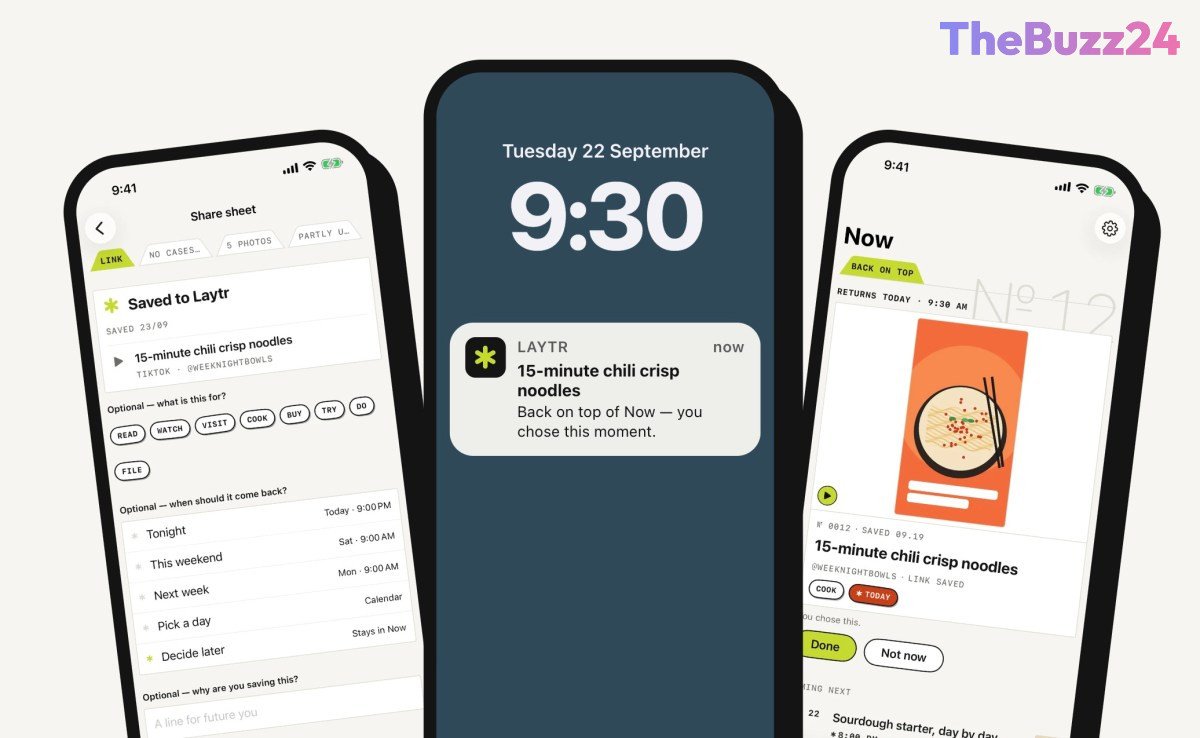
Following the discontinuation of Mozilla’s popular ‘read-it-later’ application, Pocket, a new contender named Laytr has emerged, offering a significantly expanded approach to saving online content. Unlike its predecessors that primarily focused on articles, Laytr allows users to archive virtually anything found on the web for future consumption. This includes a diverse range of media such as articles, recipes, screenshots, videos, PDFs, bookmarks, and even entire browser tabs, positioning it as a comprehensive digital locker for the internet.
The application boasts intelligent organization features, automatically categorizing different file types and enabling users to arrange them into custom collections referred to as ‘cases.’ A practical reminder function is also integrated, allowing users to set specific dates for revisiting saved items, which can be particularly useful for remembering local events or planned visits. A cornerstone of Laytr’s design is its unwavering commitment to user privacy. All saved content is stored exclusively on the user’s device, creating a private archive accessible only to them. This architecture eliminates the need for an account, ensuring that the developer cannot access any saved data. Despite this local storage, content seamlessly syncs across multiple Apple devices, including iPhone, iPad, and Mac, through iCloud.
The brainchild of Ontario-based indie developer Mostafa Talaat, operating under his company Waitery Inc., Laytr was conceived in response to Pocket’s shutdown. Talaat deliberately opted for a server-less design to uphold user privacy. He articulated his philosophy, stating, “What you save says a lot about you, and I didn’t want to be holding it. Everything stays on your device and in your own iCloud.” This privacy-centric approach means Laytr intentionally avoids features like personalized feeds or AI-driven summaries and automatic tagging. For users transitioning from Pocket, Laytr offers the convenience of importing existing Pocket exports, ensuring a smooth migration without losing previously saved items.
Laytr operates on a freemium model, offering a free tier that permits saving up to 30 items. For unlimited access and full functionality, users can subscribe to a Premium plan at $1.99 per month, $14.99 annually, or opt for a one-time lifetime purchase of $39.99 (with a promotional price of $24.99 available until the end of December). Importantly, a lapsed subscription does not result in the loss of saved content; users simply cannot add new items until they resubscribe or reduce their archive to within the free tier’s limit. Furthermore, users retain full control over their data, with the option to export their entire archive as a ZIP file, complete with readable Markdown and HTML for all items, notes, tags, dates, and collections.
Key Takeaways
- Laytr is a new app that allows users to save and organize any type of online content, from articles to videos, beyond traditional 'read-it-later' services.
- It prioritizes user privacy by storing all saved content locally on the user's device and syncing via iCloud, requiring no account and preventing developer access.
- The app offers robust organization features like automatic sorting into 'cases' and customizable reminders, with flexible pricing including a free tier and a lifetime purchase option.
Editor’s Analysis & Impact
Laytr’s emergence signifies a notable shift in the digital content archiving landscape, particularly in the wake of services like Pocket discontinuing. Its comprehensive approach to saving diverse online content, coupled with a stringent privacy-first design, directly addresses growing user concerns about data ownership and security. This could position Laytr as a strong contender against more centralized cloud-based solutions, appealing to a demographic increasingly wary of sharing personal data. The focus on local storage and iCloud sync, while currently Apple-centric, sets a precedent for how personal archiving can be managed securely. Should this model gain traction, it could inspire other developers to prioritize user privacy and control, potentially fostering a new wave of decentralized personal data management tools. Its success will likely hinge on continued feature development and potential expansion to other platforms, solidifying its role in a privacy-conscious digital future.
Frequently Asked Questions
Q: What types of content can Laytr save?
A: Laytr can save virtually anything found online, including articles, recipes, screenshots, videos, PDFs, bookmarks, and browser tabs, offering a comprehensive solution beyond typical 'read-it-later' apps.
Q: How does Laytr ensure user privacy?
A: Laytr prioritizes privacy by storing all saved content directly on the user's device and syncing it via iCloud. This means no user account is required, and the developer, Waitery Inc., cannot access any saved data, ensuring a private archive.
Q: Is Laytr a free application?
A: Laytr offers a free tier that allows users to save up to 30 items. For unlimited saving and full features, users can subscribe to a Premium plan monthly, annually, or purchase a one-time lifetime license.
AI Disclosure: This article is based on verified data and official reports. Our Team and AI have cross-referenced every financial detail with primary sources to ensure total accuracy.
More from this Category