Adobe Integrates Creative Suite Directly into Slack Workflow
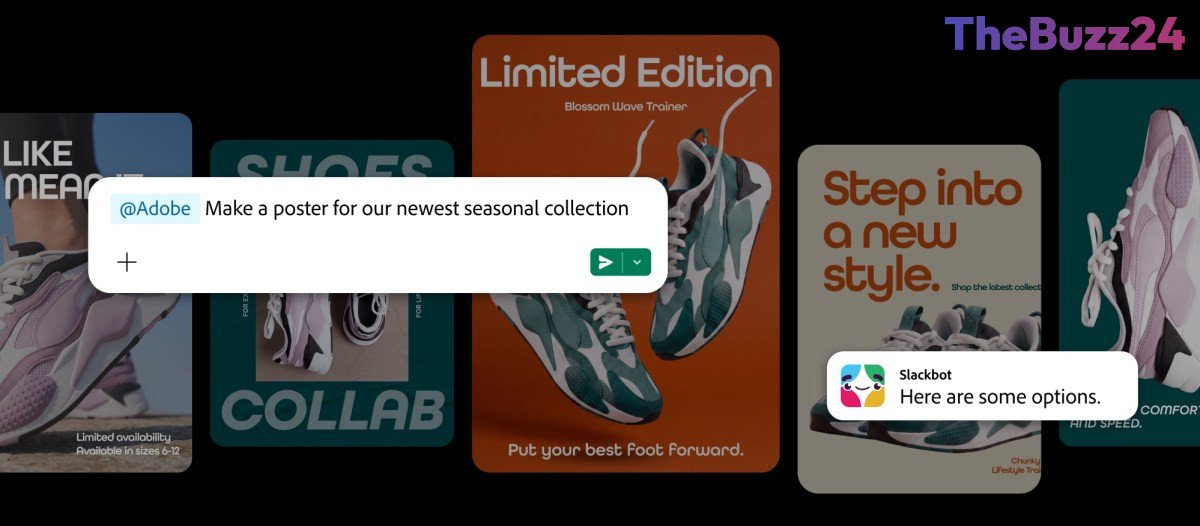
Adobe has officially launched a new integration that brings its extensive suite of creative tools directly into the Slack environment. By utilizing the Adobe for Slack MCP app, users can now access over 70 Adobe applications, including Photoshop, Premiere, Acrobat, Illustrator, and the AI-powered Firefly, without ever leaving their messaging interface. This move is designed to streamline professional workflows by allowing team members to execute creative tasks through Slack’s AI-driven chatbot.
The integration leverages the context of ongoing Slack conversations, enabling users to transform information from chats or Canvas documents into professional-grade PDFs, images, and videos. Furthermore, teams can pull assets directly from their Creative Cloud libraries into a chat, facilitating seamless editing and collaboration. This functionality is currently rolling out to Slack Business+ and Enterprise+ subscribers, marking a significant shift in how creative professionals manage their daily tasks.
This development follows Adobe’s recent push to make its tools accessible across various conversational AI platforms, including ChatGPT, with plans to expand to Google’s Gemini in the near future. By embedding these capabilities into the platforms where employees already spend their time, Adobe aims to reduce the friction of switching between applications, ultimately focusing on the final creative outcome rather than the individual steps of the editing process.
Key Takeaways
- Adobe has integrated over 70 of its creative tools into Slack via the Adobe for Slack MCP app.
- The integration allows users to generate and edit creative assets using Slack's AI chatbot while maintaining conversation context.
- The feature is currently available exclusively to Slack Business+ and Enterprise+ team accounts.
Editor’s Analysis & Impact
The integration of Adobe’s creative suite into Slack represents a broader industry trend toward ‘agentic’ workflows, where software tools are increasingly accessed through conversational interfaces rather than standalone applications. By embedding high-end creative capabilities into communication hubs, Adobe is effectively positioning itself as a utility that follows the user, rather than a destination that requires a context switch. This strategy is critical for maintaining market share against competitors like Canva and Figma, which are also aggressively pursuing chatbot integrations. As AI agents become more sophisticated, the ability to pull context from team communications to automate complex creative tasks will likely become a standard expectation for enterprise software. This shift signals a future where the ‘workspace’ is defined by the flow of information rather than the specific software interface used to process it.
Frequently Asked Questions
Q: Which Slack plans currently support the Adobe integration?
A: The Adobe for Slack integration is currently available to users on Slack Business+ and Enterprise+ plans.
Q: Can I edit assets directly within the Slack interface?
A: Yes, the integration allows users to bring assets from the Creative Cloud library into a chat and perform edits, as well as generate new content using Adobe's AI tools based on conversation context.
AI Disclosure: This article is based on verified data and official reports. Our Team and AI have cross-referenced every financial detail with primary sources to ensure total accuracy.
More from this Category