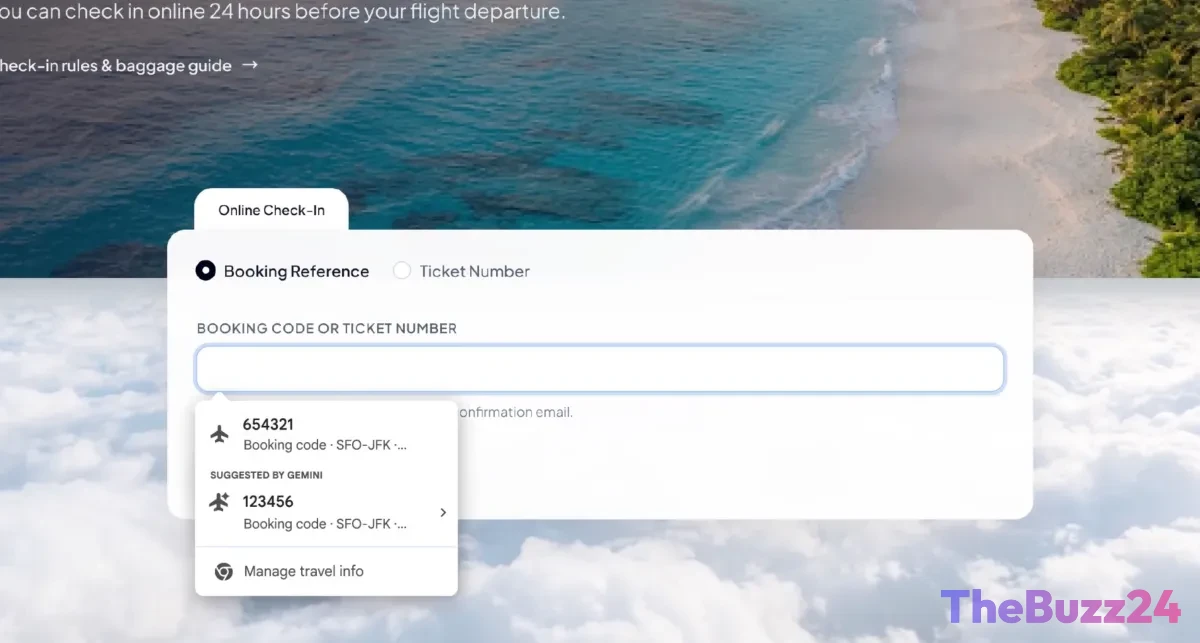
Google Chrome Supercharges Forms with AI-Powered Gmail Integration
Google is significantly enhancing its Chrome browser’s autofill functionality by integrating artificial intelligence that can pull relevant information directly from a user’s Gmail account. This new feature aims to streamline the process of filling out online forms, offering suggestions for details such as flight confirmation numbers, membership IDs, tracking information, order numbers, addresses, phone numbers, and even credit card details by intelligently scanning email content.
The update represents an evolution of Google’s Personal Intelligence initiative, which already allows users to connect their Google Apps with its AI assistant, Gemini, for retrieving specific data points to answer complex queries. By extending this capability to Chrome’s autofill, Google is making it more convenient for users to manage and input information across various online platforms, potentially strengthening user engagement with its browser and broader AI ecosystem.
This advancement draws parallels to features seen in competing ecosystems, such as Apple’s ability to automatically detect and present verification codes from text messages. Google emphasizes that users will have control over this enhanced autofill feature, with the option to enable or disable it within Chrome’s settings. The company also assures that sensitive data accessed for this purpose is encrypted, adhering to privacy standards.
The AI-powered autofill is currently rolling out to users in the United States across desktop versions of Chrome, as well as within the iOS and Android applications for Gemini in Chrome.
Key Takeaways
- Chrome's autofill now uses AI to extract information from Gmail for faster form completion.
- The feature can suggest details like order numbers, flight confirmations, and contact information.
- Users can control the feature, and Google states sensitive data is encrypted.
Editor’s Analysis & Impact
This integration marks a significant step in Google’s strategy to deepen the utility of its core browser and AI offerings. By leveraging Gmail data, Chrome’s autofill becomes a more powerful and context-aware tool, potentially increasing user retention and engagement within Google’s ecosystem. The move could also set a new benchmark for browser convenience, prompting competitors to explore similar AI-driven integrations. While privacy concerns are addressed through encryption and user control, the broader implications for data utilization and user trust will be closely watched as the feature rolls out.
Frequently Asked Questions
Q: How does Chrome's new AI-powered autofill work?
A: The feature uses AI to scan your Gmail for relevant information like order numbers, flight confirmations, and contact details, then suggests this data to automatically fill out online forms.
Q: Can I turn off this feature?
A: Yes, Google states that users can choose to enable or disable this enhanced autofill functionality through their Chrome settings.
Q: Is my sensitive data safe with this feature?
A: Google assures that any sensitive data accessed for this feature is encrypted and that users have control over its usage.
AI Disclosure: This article is based on verified data and official reports. Our Team and AI have cross-referenced every financial detail with primary sources to ensure total accuracy.
More from this Category