WhatsApp Expands Cross-Device Functionality with iPad Registration and Enhanced In-Car Features
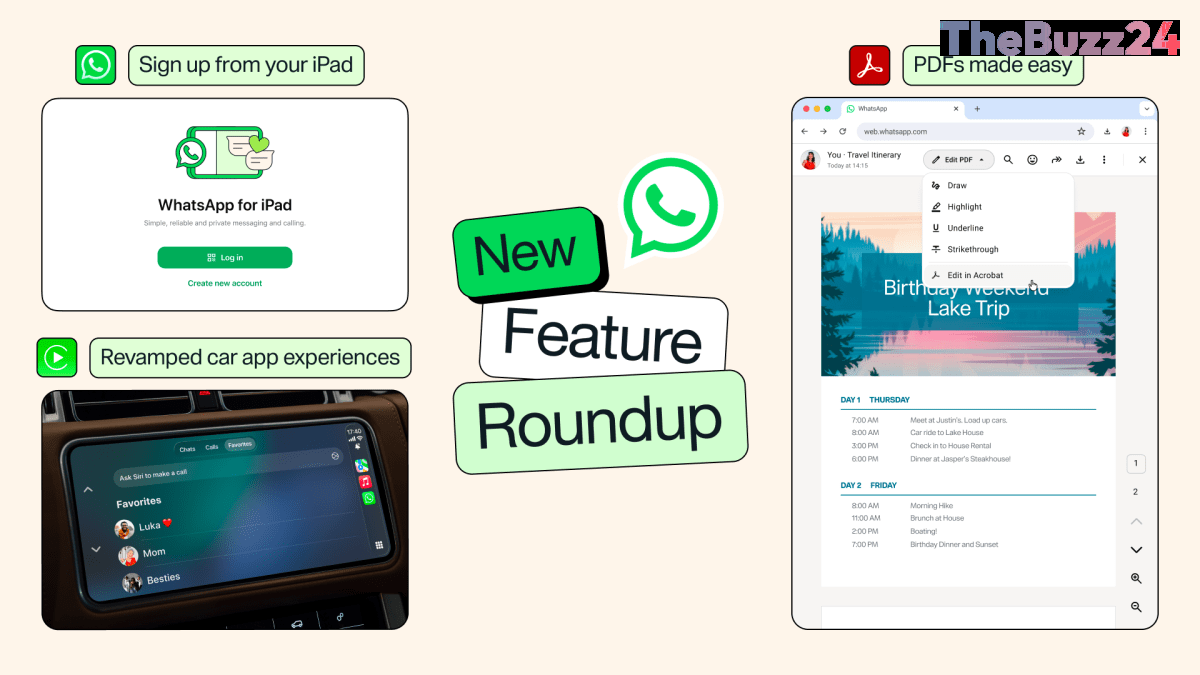
WhatsApp is significantly broadening its utility as a comprehensive communication platform with a series of updates aimed at improving cross-device integration and user convenience. Among the most notable changes is a revamped experience for Apple CarPlay and Android Auto, which now allows users to do more than just initiate calls or messages. Drivers can now listen to and dictate replies to messages, browse their call history, and access favorite contacts directly through their vehicle’s infotainment system, creating a more seamless hands-free experience.
In a move to increase accessibility, WhatsApp has introduced the ability for users to register for an account directly on an iPad. Previously, tablet users were required to link their device to an existing smartphone account. While a phone number is still necessary to receive a one-time verification code during setup, the iPad app now functions as a standalone account, removing the need for a primary phone to be active or linked as a companion device.
Beyond device connectivity, the platform is introducing new creative and productivity tools. Users can now share music directly from Apple Music or Spotify to their WhatsApp Status, offering a new way to personalize their profiles. Furthermore, the app has streamlined document management by allowing users to open, highlight, and annotate PDFs directly within the chat interface on web and desktop versions, eliminating the need to download files for minor edits.
Key Takeaways
- WhatsApp now supports direct account registration on iPads, eliminating the requirement to link to a primary smartphone.
- Apple CarPlay and Android Auto integrations have been upgraded to include message playback, dictation, and call history access.
- New features include direct PDF annotation within the app and the ability to share Apple Music or Spotify tracks to WhatsApp Status.
Editor’s Analysis & Impact
This update marks a strategic shift for WhatsApp as it moves away from being a mobile-first messaging tool toward becoming a platform-agnostic communication hub. By decoupling the iPad experience from the smartphone and enhancing in-car productivity, the company is directly addressing the needs of power users who operate across multiple hardware ecosystems. The integration of document editing and music sharing further signals an attempt to retain users within the app for longer durations, effectively competing with broader productivity and social platforms. As Meta continues to roll out subscription-based ‘Plus’ tiers and username features, these functional updates serve to increase the platform’s stickiness, making it increasingly difficult for users to migrate to competing encrypted messaging services.
Frequently Asked Questions
Q: Do I still need a phone number to sign up for WhatsApp on an iPad?
A: Yes, you still need a valid phone number to receive a one-time passcode for the initial account registration, even though the iPad app functions independently afterward.
Q: Can I edit PDFs directly inside the WhatsApp mobile app?
A: Currently, the ability to open, highlight, and annotate PDFs directly within the interface is available on the web and desktop versions of WhatsApp.
AI Disclosure: This article is based on verified data and official reports. Our Team and AI have cross-referenced every financial detail with primary sources to ensure total accuracy.
More from this Category