Next-Gen Design: Figma Introduces Code Layers, Enhanced AI, and Direct Animation Capabilities
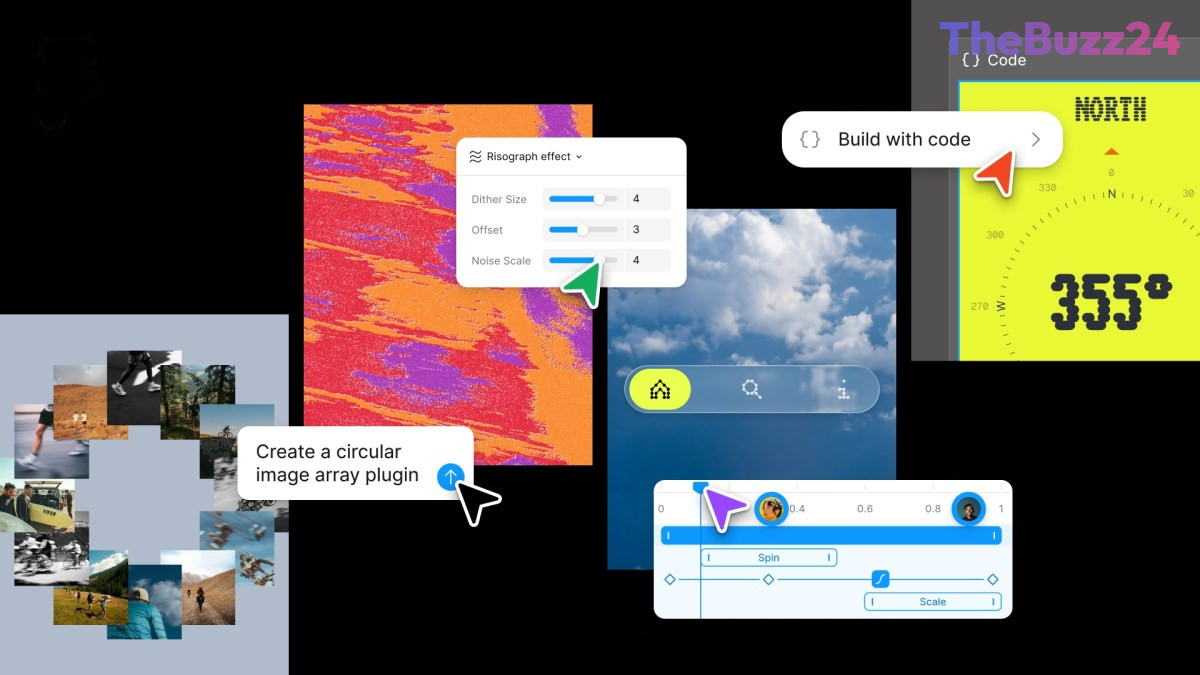
Leading collaborative design platform Figma has unveiled a significant update, introducing a suite of features aimed at streamlining the design-to-development workflow. The latest enhancements include a novel code layer, comprehensive support for motion and shaders, and advanced capabilities for creating custom AI-powered plugins. This release marks a pivotal step in Figma’s ongoing mission to deeply integrate code into its design environment, building on previous initiatives like the AI prompt-based prototyping tool, Figma Make, and integrations with Claude Code and Codex.
A cornerstone of this update is the direct integration of code layers onto Figma’s collaborative canvas. This innovative feature empowers design and development teams to clone code repositories and extract specific flows from code into design layers for rigorous testing and iteration. Yuhki Yamashita, Figma’s chief product officer, emphasized the transformative potential of this “multiplayer canvas.” He noted that it allows designers, product managers, and programmers to rapidly explore and iterate on ideas without the immediate pressure of producing production-ready code, fostering a more fluid and experimental design process.
Beyond code integration, the update dramatically expands Figma’s animation capabilities. Designers can now directly incorporate animations, transitions, and 3D transforms within the platform, eliminating the previous necessity of using external software and converting animations into code. Artificial intelligence further augments these creative tools, enabling users to generate assets and apply sophisticated shader effects and fills with AI assistance. This builds upon Figma’s acquisition of Weavy last year, a node-based tool, with future updates promising direct Weavy workflow generation within Figma.
The platform’s AI assistant also receives substantial upgrades, becoming more versatile within the collaborative canvas. Users can now craft text prompts to create repeatable “skills” for AI agents, automating various design tasks. Furthermore, the AI bot can be connected to external tools such as Notion, Granola, Excel, and GitHub, or provided with attached files, granting it richer context to execute more precise and helpful actions. This extends to the creation of custom plugins, like layout generators or vector path tracers, which can now be generated simply through text prompts.
Key Takeaways
- Figma introduced code layers for direct code integration into its design canvas, streamlining collaboration between designers and developers.
- The update significantly enhances animation capabilities, allowing designers to create transitions and 3D transforms directly within Figma, alongside AI-powered asset and shader effects.
- Figma's AI assistant gains new "skills" and custom plugin creation features, enabling users to automate tasks and integrate external data sources for more contextual AI assistance.
Editor’s Analysis & Impact
This major update from Figma is set to significantly impact the product design and development industry. By blurring the lines between design and code, Figma is solidifying its position as a central hub for collaborative product creation. The introduction of code layers will likely accelerate iteration cycles and improve the efficiency of design-to-development handoffs, potentially setting a new industry standard. The enhanced AI capabilities, from asset generation to custom plugin creation, democratize advanced design functionalities and could lead to more innovative and rapidly developed digital products. Competitors will likely feel pressure to integrate similar features, fostering a new wave of innovation in design tools and ultimately benefiting end-users with more sophisticated and seamlessly integrated digital experiences.
Frequently Asked Questions
Q: What are "code layers" in Figma?
A: Code layers allow design teams to integrate actual code repositories and extract code flows directly onto the Figma canvas for testing and iteration, bridging the gap between design and development.
Q: How does AI enhance the new Figma update?
A: AI is used for creating assets, applying shader effects, and powering a more capable AI assistant that can perform repeatable tasks based on text prompts and integrate with external tools for context.
Q: What kind of animations can now be created directly in Figma?
A: Designers can now integrate animations, transitions, and 3D transforms directly into their Figma projects, eliminating the need for external software for these elements.
AI Disclosure: This article is based on verified data and official reports. Our Team and AI have cross-referenced every financial detail with primary sources to ensure total accuracy.
More from this Category