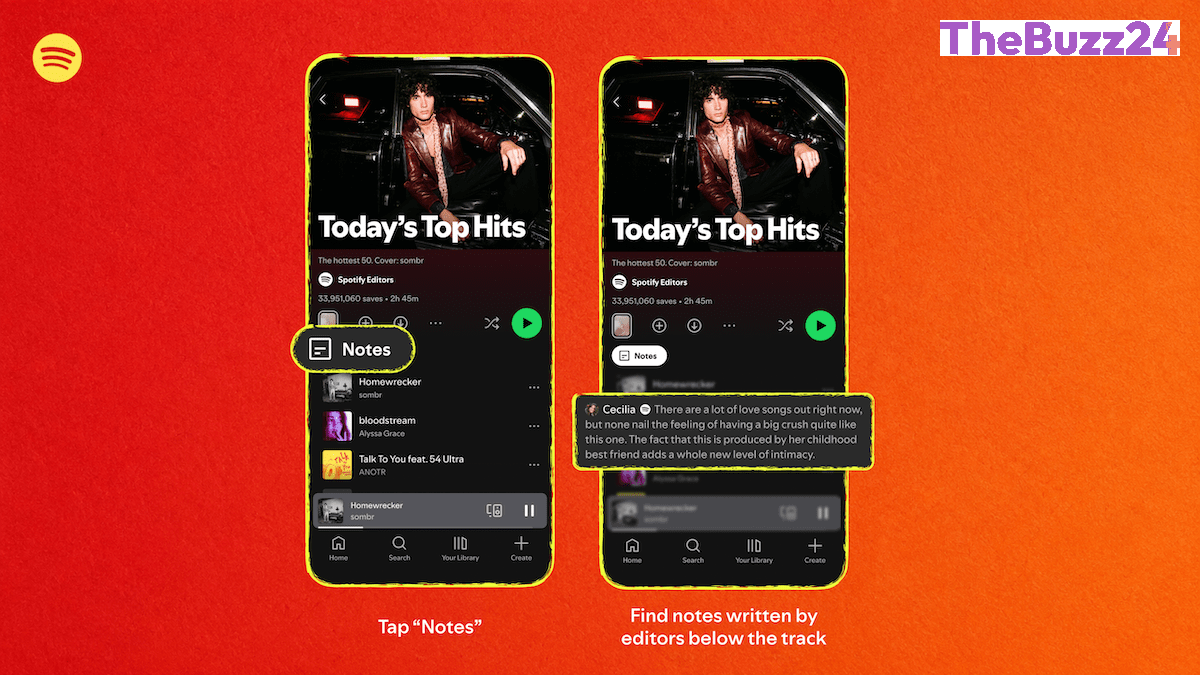
Spotify Enhances Social Listening with New Playlist Notes Feature
Spotify has officially introduced ‘Playlist Notes,’ a new feature designed to foster deeper connections between listeners and their curated content. Building upon the recently launched ‘User Notes’ functionality, this update allows users to attach personal commentary to individual songs, podcast episodes, and audiobooks within their playlists. Whether documenting a specific memory or explaining the significance of a track, users can now provide context that is visible to anyone with access to the playlist.
Beyond user-generated content, the platform is integrating this feature into its own editorial strategy. Spotify’s internal curators will now include notes on major playlists such as ‘Today’s Top Hits,’ ‘RapCaviar,’ and ‘Hot Country,’ offering listeners insight into the reasoning behind song selections. To further humanize the curation process, the company is also launching ‘Editor Profiles,’ which showcase the musical tastes and professional portfolios of the individuals responsible for these popular playlists.
The rollout is currently underway across iOS and Android platforms in over 100 markets for user notes. Meanwhile, the editorial notes and curator profiles are being introduced to both free and premium users aged 16 and older in select regions, including the U.S., Canada, the U.K., Ireland, Australia, and New Zealand. This move reflects Spotify’s broader strategy to transform its platform from a passive streaming utility into a more interactive, social-first environment.
Key Takeaways
- Users can now add personal context and stories to individual tracks and episodes within their playlists.
- Spotify is humanizing its editorial process by allowing curators to explain song choices and providing public profiles for editors.
- The feature is part of a larger initiative to increase social engagement and differentiate the platform from competitors like Apple Music and YouTube Music.
Editor’s Analysis & Impact
Spotify’s introduction of Playlist Notes is a calculated move to increase user retention through social stickiness. By transforming playlists from static lists into narrative-driven experiences, the platform is effectively leveraging the ‘creator economy’ model to deepen user engagement. This strategy serves two purposes: it encourages users to spend more time within the app crafting their own content, and it provides a layer of transparency to the platform’s editorial curation. In a market saturated with algorithmic recommendations, humanizing the curation process through Editor Profiles helps build trust and brand loyalty. As Spotify continues to scale its user base—recently surpassing 300 million subscribers—these social features act as a defensive moat, making the platform feel more like a community-driven social network rather than just a commodity streaming service.
Frequently Asked Questions
Q: How do I add a note to a song in my playlist?
A: Open a playlist you own or collaborate on within the mobile app, tap the three dots next to the track, podcast, or audiobook, select 'add note,' and save your text.
Q: Who can see the notes I add to my playlists?
A: Any user who has access to view your playlist will be able to read the notes you have attached to the tracks.
AI Disclosure: This article is based on verified data and official reports. Our Team and AI have cross-referenced every financial detail with primary sources to ensure total accuracy.
More from this Category