Apple Watch’s New AI Audio Features Spark Privacy and Consent Debates
During a recent hardware showcase, Apple introduced a series of groundbreaking artificial intelligence features for its smartwatch lineup, shifting the boundaries of wearable technology. Among the most notable updates are capabilities that allow the device to process live audio, alert users to environmental sounds, and transcribe spoken conversations. While these tools offer significant accessibility and utility benefits, they have also ignited a broader conversation regarding surveillance, user consent, and the evolving social norms surrounding always-listening gadgets.
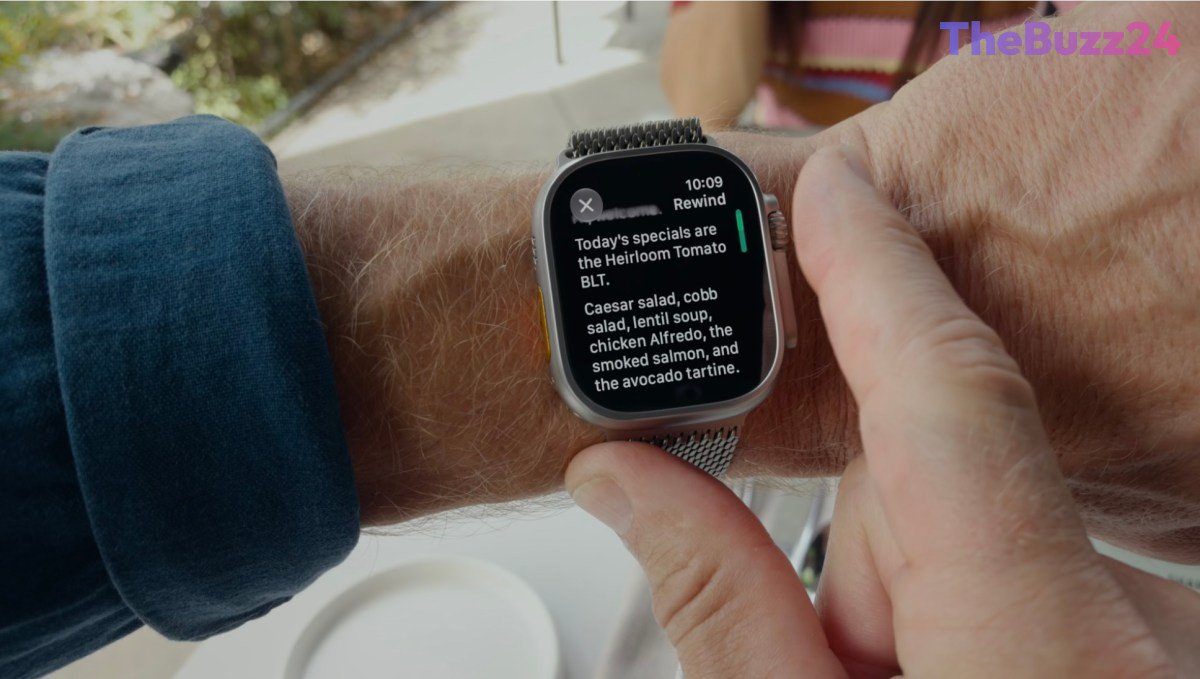
The inclusion of Audio Intelligence brings undeniable practical advantages, particularly for individuals who are deaf or hard of hearing. By utilizing on-device AI, the watch can independently detect critical sounds such as sirens, alarms, and crying babies, providing potential life-saving alerts without requiring a tethered iPhone. However, the introduction of features like ‘Live Rewind’ and ‘Siri Recap’ pushes the technology into more complex territory. Live Rewind enables wearers to capture and transcribe the previous 15 seconds of spoken words with a simple press of the digital crown, while Siri Recap generates high-level summaries of conversations based on ambient listening.
These capabilities present unique ethical and legal questions regarding consent. Although Apple emphasizes that raw audio is never recorded, stored, or accessible—and protects the resulting text with end-to-end encryption—the ability to discreetly document spoken interactions may alter everyday social dynamics. Critics and legal experts point out that text-only transcripts bypass traditional audio verification methods, creating a grey area for evidence and privacy compliance. As consumers weigh the convenience of automated note-taking against the discomfort of pervasive recording, the success of these new tools will depend heavily on whether users feel their personal boundaries are adequately respected.
Key Takeaways
- Apple introduced new AI-powered audio features for the Apple Watch, including Live Rewind and Siri Recap.
- The tools offer valuable accessibility benefits, such as alerting hard-of-hearing users to environmental dangers like alarms.
- Features that enable subtle conversation transcription raise important questions about privacy, social norms, and legal consent.
Editor’s Analysis & Impact
The integration of ambient listening and transcription tools into mainstream wearables like the Apple Watch marks a critical turning point for the consumer technology sector. As tech giants race to embed generative AI into everyday devices, balancing utility with privacy has never been more challenging. While accessibility-focused features are universally praised, passive recording and quick-transcription utilities risk alienating privacy-conscious consumers who are already fatigued by pervasive surveillance culture. In the long term, Apple’s implementation will likely set a benchmark for how competitors design AI wearables. If consumers embrace these features, it could normalize ambient recording across the industry; conversely, a strong backlash may force hardware manufacturers to implement stricter physical indicators and consent protocols before these tools become ubiquitous.
Frequently Asked Questions
Q: Do the new Apple Watch AI features save actual audio recordings?
A: No, Apple has stated that the device does not create, store, or provide access to raw audio recordings. Instead, it generates text-only transcripts and summaries which are protected with end-to-end encryption.
Q: What is the purpose of the Live Rewind feature?
A: Live Rewind allows a user to press the digital crown on their Apple Watch to go back 15 seconds and transcribe what was just said, helping them remember details like book recommendations or colleague instructions.
Q: Are the AI listening features always turned on by default?
A: No, features like Siri Recap do not default to being constantly active. Users have the flexibility to choose when the feature is enabled—such as restricting it to work hours—and can turn it off at any time via the Control Center.
AI Disclosure: This article is based on verified data and official reports. Our Team and AI have cross-referenced every financial detail with primary sources to ensure total accuracy.
More from this Category