WhatsApp Web Introduces In-Browser Calling, Device Handoff, and Meeting Waiting Rooms
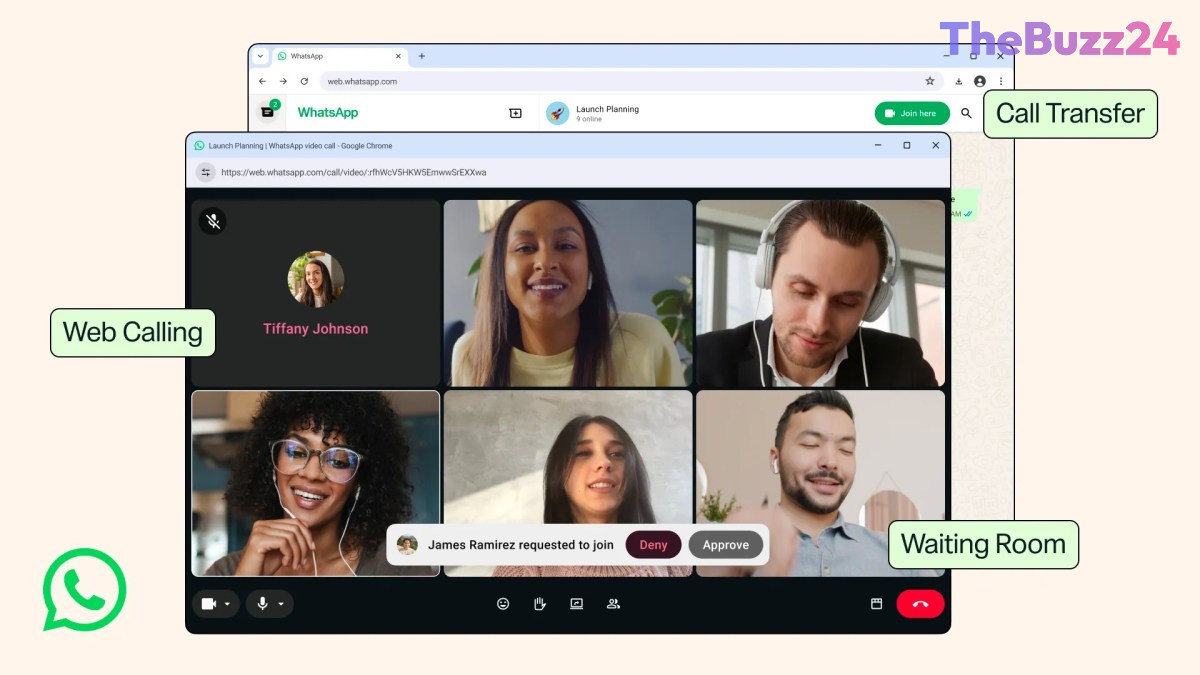
Meta has officially expanded WhatsApp Web’s capabilities by introducing native audio and video calling directly within web browsers. Previously restricted to mobile applications and desktop software, this feature brings a full-fledged communication suite to browser users. A dedicated Calls tab has been integrated into the web client, housing call history, contact favorites, screen-sharing tools, and interactive call reactions.
Alongside browser-based calling, WhatsApp is rolling out multi-device call continuity. This functionality allows users to seamlessly transfer ongoing voice or video calls between smartphones, desktop clients, and web browsers without disconnecting. To better support professional and group meetings, the platform has also introduced virtual waiting rooms. Hosts generating call links can now toggle an approval requirement, granting them full control over who enters or is removed from group sessions.
To improve overall call quality, the service is integrating background noise suppression to filter out ambient sounds in noisy environments. Additionally, video calls will now stream in high definition immediately upon connection, eliminating the previous delay required to ramp up visual resolution. These upgrades complement WhatsApp’s upcoming username feature, which will eventually enable users to initiate calls across platforms without sharing phone numbers.
Key Takeaways
- WhatsApp Web now supports direct audio and video calls with screen sharing and a dedicated Calls tab.
- Users can seamlessly transfer live calls between mobile, desktop, and web platforms without hanging up.
- New administrative features include waiting rooms for call links, noise suppression, and instant HD video streaming.
Editor’s Analysis & Impact
By bringing voice and video capabilities directly to web browsers, Meta is actively positioning WhatsApp as a robust alternative to established work communication platforms like Zoom, Google Meet, and Microsoft Teams. The introduction of waiting rooms, screen sharing, and background noise suppression signals a deliberate push to capture business and remote productivity markets. Furthermore, seamless device handoff resolves a widespread inconvenience for flexible workers who transition between workstation setups and mobile devices throughout the day. Coupled with the upcoming platform-wide username system, these feature additions significantly lower friction for new connections and strengthen WhatsApp’s overall ecosystem across both personal and professional domains.
Frequently Asked Questions
Q: How do you make calls on WhatsApp Web?
A: Users can initiate audio or video calls directly from their web browser by selecting the Call tab or using the calling icons within an individual or group chat on WhatsApp Web.
Q: Is it possible to switch a WhatsApp call from PC to mobile without disconnecting?
A: Yes, WhatsApp's new call transfer feature enables users to seamlessly hand off active voice or video calls between desktop browsers, desktop apps, and mobile phones without interrupting the conversation.
Q: What is the new waiting room feature in WhatsApp?
A: When generating a call link, meeting hosts can enable 'Require approval to join.' This creates a virtual waiting room where hosts must manually grant entry to participants before they can join the group call.
AI Disclosure: This article is based on verified data and official reports. Our Team and AI have cross-referenced every financial detail with primary sources to ensure total accuracy.
More from this Category